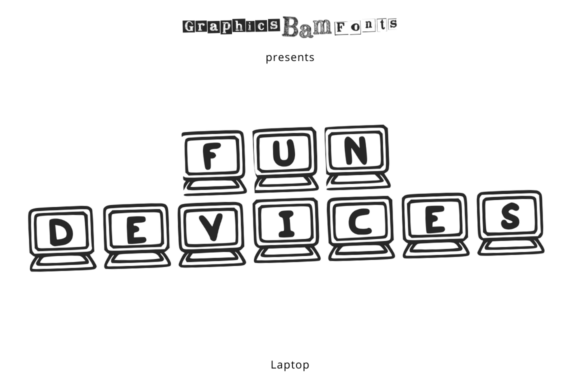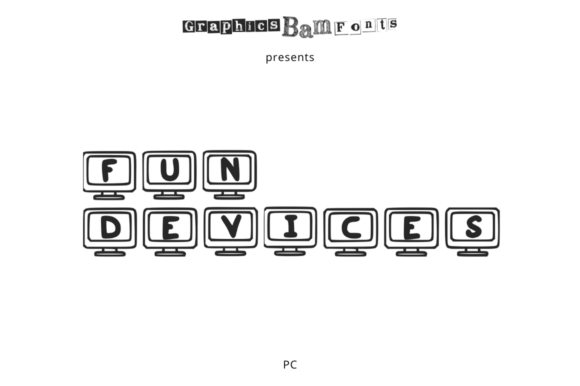
Fun Devices PC: A Creative Tool for Digital Expression
For designers, content creators, and anyone looking to add a unique flair to their digital projects, Fun Devices PC offers more than just a font—it's a versatile tool that can bring visual interest and personality to any design. This decorative font features a range of devices, including tablets, desktops, and laptops, making it ideal for a variety of creative applications.
Understanding Fun Devices PC
Fun Devices PC is part of the broader Fun Devices family, which includes additional devices beyond the standard set. The font is designed to be both functional and fun, allowing users to incorporate device-like elements into their typography. Whether you're creating social media graphics, website headers, or promotional materials, this font can help you stand out with its playful yet professional look.
The font’s design makes it particularly useful in scenarios where visual storytelling is key. For example, if you're designing a presentation about technology trends, using Fun Devices PC can help reinforce the theme with visuals that mirror the subject matter. It’s also great for branding, especially for businesses targeting younger, tech-savvy audiences.
Real-World Applications of Fun Devices PC
One of the most common uses for Fun Devices PC is in digital marketing. Social media platforms like Instagram and Pinterest thrive on visually engaging content, and this font can help create eye-catching posts that capture attention. Imagine a post promoting a new app or software—using a device icon as part of the text can make the message more relatable and memorable.
Another practical application is in educational content. Teachers and educators often need to present information in an engaging way, and Fun Devices PC can help make lesson plans, infographics, or study guides more interactive. For instance, a lesson on computer hardware could use the font to illustrate different components, making the material more accessible and enjoyable for students.
Businesses in the tech industry can also benefit from this font. Startups and established companies alike may want to highlight their products or services with a unique visual identity. Using Fun Devices PC in logos, banners, or product pages can give a brand a modern, approachable feel that resonates with customers.
Who Benefits from Using Fun Devices PC?
Designers and illustrators are among the primary users of this font, as it allows them to experiment with typography in new ways. For those who work on creative projects, having access to a font like Fun Devices PC can expand their design possibilities and help them produce more dynamic work.
Content creators, such as YouTubers, bloggers, and podcasters, can also find value in this font. Adding a device-themed element to thumbnails, titles, or promotional materials can make their content more visually appealing and consistent with their brand. It’s a subtle but effective way to enhance the overall look of their online presence.
Even non-designers can benefit from using Fun Devices PC. For example, someone creating a personal website or portfolio might want to add a unique touch to their layout. The font can be used to highlight key sections or add a bit of personality to otherwise plain text.
Considerations Before Using Fun Devices PC
While Fun Devices PC is a powerful tool, it’s important to consider how it will fit into your overall design strategy. One key factor is readability. While the font is meant to be decorative, it should still be legible, especially when used in larger text sizes. If the design becomes too cluttered or difficult to read, it may detract from the message rather than enhance it.
Another consideration is the context in which the font is used. For formal or professional settings, a more traditional font might be more appropriate. However, in casual or creative environments, Fun Devices PC can add a refreshing twist that sets the work apart.
Users should also be aware of licensing and usage rights. Depending on where the font is being used, there may be restrictions on how it can be applied. It’s always a good idea to check the terms of use before incorporating the font into any project, especially if it’s for commercial purposes.
Strengths and Limitations of Fun Devices PC
One of the main strengths of Fun Devices PC is its versatility. It can be used across multiple platforms and design formats, from web development to print materials. Its unique style makes it stand out in a crowded design landscape, offering a fresh alternative to more conventional fonts.
However, it’s not without limitations. The font’s decorative nature means it may not be suitable for all types of content. In cases where clarity and professionalism are paramount, it might be better to opt for a more straightforward typeface. Additionally, some users may find the device elements distracting if they’re not used intentionally or thoughtfully.
Despite these limitations, Fun Devices PC remains a valuable addition to any designer’s toolkit. Its ability to blend functionality with creativity makes it a go-to choice for those looking to add a little extra flair to their work.
How to Incorporate Fun Devices PC Into Your Workflow
Getting started with Fun Devices PC is relatively straightforward. Most design software, including Adobe Photoshop, Illustrator, and Canva, supports custom fonts, so users can easily download and apply the font to their projects. It’s also compatible with web development tools, making it a flexible option for digital designers.
When integrating the font into a design, it’s helpful to start with a clear purpose. Ask yourself what message you want to convey and how the font can support that goal. Experimenting with different placements, sizes, and color combinations can help you find the best way to use the font effectively.
Finally, don’t be afraid to mix and match. Combining Fun Devices PC with other fonts can create a balanced and cohesive look. For example, using it as a headline while pairing it with a simpler body font can draw attention to key points without overwhelming the reader.